
Comprehensive Cyber Protection for Your Mobile & Privacy
Safeguard your smartphone from malware threats, phishing scams, and unsafe public Wi-Fi networks. Works silently and efficiently without draining battery or slowing down your device.
Download App on Your Phone



Active Protection
Powered by Norton™ Engine
Wi-Fi & Web Shield
24/7 Threat Detection
Official Partners
Trusted by Indonesia's digital ecosystem
Together with Gardanet, partner channels expand access to Norton digital security solutions.





Comprehensive Protection Against Evolving Cyber Threats
Gardanet provides Norton protection that works silently in the background to help protect your banking details, social media credentials, and daily privacy.
24/7 Real-Time Threat Detection
Analyzes new malware variants, ransomware, and trojans before they can infect your smartphone operating system.
Anti-Phishing & Banking Shield
Automatically blocks fraudulent websites and fake login forms designed to steal your passwords, PINs, or OTP codes.
Silent & Battery-Saving Architecture
Ultra-lightweight design ensures zero RAM burden, no excessive battery drain, and smooth device responsiveness.

360° Protection
Norton Security Engine
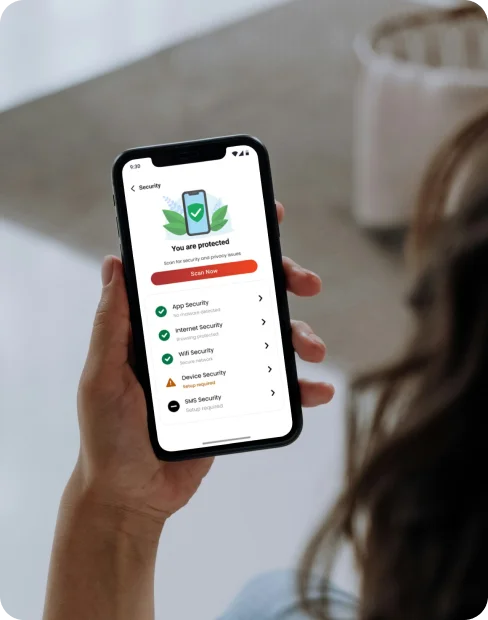
Comprehensive Security Features at Your Fingertips
All-in-one protection silently guarding your smartphone, safeguarding personal data, privacy, and online activities every day.

Web Protection
Blocks fraudulent websites, spoofed login pages, and dangerous links across browsing, email, and social apps.

Device Security
Scans OS vulnerabilities to prevent unauthorized device hijacking and confidential data theft.

WiFi Security
Instantly alerts and safeguards your transactions and credentials whenever connecting to suspicious Wi-Fi.

Risky Network Detection
Defends against Man-in-the-Middle (MITM) attacks on compromised networks in cafes, hotels, and airports.

Device Reports
Clear visual overview of blocked cyber threats, verified networks, and security status over the last 30 days.

SMS Security
Automatically filters deceptive SMS messages containing dangerous APK download links or bank fraud.

App Advisor
Powered by Norton's award-winning scan engine to detect spyware, adware, and excessive app permissions.

Protected Calendar
Detects hazardous links slipped into synchronized calendar invites across iOS and Android.
Wi-Fi Verified Safe
Active Network Encryption
Browse Safely Anywhere, Including Cafe & Airport Wi-Fi
Unencrypted public Wi-Fi networks are prime targets for cybercriminals. Our proactive protection checks network integrity and certificates immediately before you connect.
Automated Security Audit
Instantly verifies whether a Wi-Fi network uses adequate encryption or poses vulnerability to intruders.
Block Unauthorized Access & MITM
Prevents Man-in-the-Middle (MITM) attacks attempting to intercept banking credentials or confidential passwords.
Protect Your Mobile Today. Download Now.
Browse, transact, and communicate with confidence. Get Norton products through Gardanet, install the app, and activate your license in a few easy steps.
Supports Android 8.0+ and iOS 14.0+ operating systems
Comprehensive Answers to Your Questions
Learn more about how cyber protection, device compatibility, and Norton license activation work.
What does the Norton security app protect against?
How do I activate my purchased Norton license?
Is the application available for both Android and iPhone?
Does the security app slow down phone performance?
How do I choose the most suitable plan?
Where can I contact support if I experience difficulties?

Still Need Assistance?
Have specific questions about license activation or need installation assistance? The Gardanet support team is here to assist you.
WhatsApp Hotline
High Priority+62 888-634-9898
Support Email
Official Channelnorton@tripleone.id